
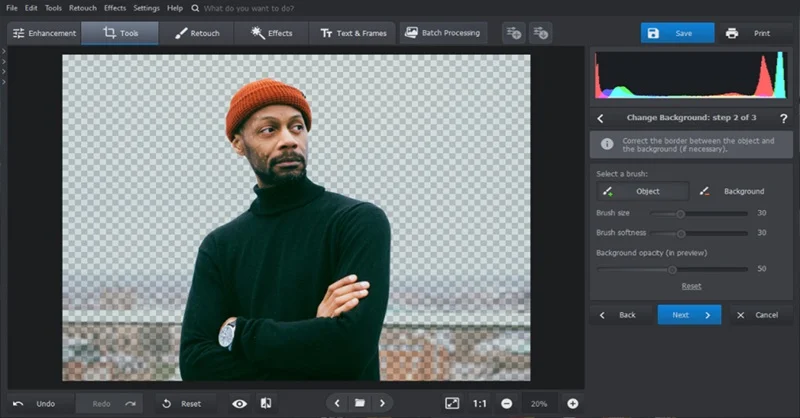
If you want to clean up, polish, or transform your photos quickly without installing software or hiring a designer, you have more options today than ever before. This guide is written for small business owners, content creators, and everyday users who want a clear way to compare online tools that offer background removal and image enhancement in one place. By the time you finish reading, you will know exactly what to look for, which questions to ask, and which type of tool fits your specific needs. No design experience is assumed or required.
Why So Many People Are Searching for Online Photo Editors Right Now
The demand for fast, browser-based photo editing has grown significantly over the past few years, and the reasons are straightforward. More people are running online shops, building personal brands, and creating content for social media without the budget or time for professional photography sessions. A blurry background, an off-color product shot, or a cluttered image backdrop can undermine an otherwise great photo.
Tools that combine background removal with broader image enhancement used to require desktop software, subscription fees, and a learning curve. Today, a growing category of web-based platforms does this work with AI in a matter of seconds. The challenge is no longer finding a tool; it is finding the right one.
8 Criteria to Evaluate Any Online Photo Editing Tool
Before settling on a tool, run it through these criteria. The best choice will score well across most of them relative to your specific use case.
1. Ease of use for non-designers
Look for an interface that does not require you to understand layers, masks, or complex export settings. A good tool lets you upload an image, make the edit, and download the result in three steps or fewer. If the platform assumes prior knowledge of design terminology, it may slow you down rather than help you.
2. Background removal accuracy
Not all background removal tools are equal. The best ones detect subject edges precisely, even when there is hair, fur, or transparent material involved. Test a tool on a photo that has a complex subject before committing to it. Some platforms allow you to manually refine the result after the AI makes its initial cut, which is a meaningful advantage when precision matters.
3. Image enhancement capabilities beyond basic cropping
True image enhancement goes beyond trimming and resizing. Look for tools that offer automatic exposure adjustment, contrast and brightness control, saturation tuning, and sharpening. These adjustments can take a flat, underexposed photo and make it look professionally lit. Some tools also include noise reduction for photos taken in low light.
4. AI-powered features and generative tools
The newest generation of tools includes AI that goes beyond background removal. Features like object removal (eliminating photobombers or distracting elements), object addition (inserting props or elements into a scene), and generative background creation from a text prompt are now available in browser-based platforms. These are worth seeking out if you are doing product photography or content creation at scale.
5. Output quality and file format options
A tool is only useful if the final file meets your platform’s requirements. Check whether the tool exports in PNG (which supports transparency) and JPG, and confirm the maximum resolution available on the free or entry-level tier. For product listings, social media, and print, you typically want images that are at least 1000 pixels on the shortest side.
6. Mobile accessibility
Many users edit photos on their phones between meetings or on the go. A tool that works smoothly on a mobile browser or has a dedicated app gives you flexibility. Confirm that the mobile version supports the same features as the desktop version, since some platforms strip functionality on smaller screens.
7. Free tier availability and what it actually includes
Some tools advertise a free version that is heavily restricted in practice. Check whether background removal is included in the free tier, whether there are watermarks on downloaded images, how many edits you can make per day, and whether AI features require a paid plan. A genuinely usable free tier makes a real difference if you are testing the tool before committing.
8. Integration with broader design workflows
If you plan to take your edited photo and turn it into a social media post, a product listing, or a flyer, a tool that lets you continue editing within the same platform is far more efficient than one that only exports a cropped image. Look for tools that connect photo editing to design templates, stock assets, and direct publishing options.
Types of Tools You Will Encounter
Standalone Background Removers
These are single-purpose tools focused entirely on isolating a subject from its background. They are fast and often require no account to use. The upside is speed; the downside is that you will need a separate tool to do anything else with your image after the background is removed. For occasional quick cuts, they get the job done. For anyone working through a regular content workflow, the back-and-forth between tools adds friction.
When evaluating a standalone remover, pay close attention to edge detection quality. Run a test image with fine details like flyaway hair or a transparent bottle to see how the AI handles complexity. Many of these tools are excellent at simple subjects on plain backgrounds but struggle with nuanced scenes.
Full-Featured Online Photo Editors
This category includes platforms that combine background removal with a broader suite of editing tools. The appeal is obvious: you can remove a background, adjust exposure and color, resize the image, and drop it into a design template all within the same session. For small business owners, marketers, and content creators who produce visuals regularly, this approach saves significant time.
The tradeoff can be a slightly steeper learning curve compared to a single-purpose tool, though the best platforms in this category prioritize simplicity and have done a great deal of work to make advanced features accessible to users with no design background.
AI-Native Creative Editors
A newer subcategory is emerging around generative AI. These tools do not just remove what is there; they can add new elements, generate entirely new backgrounds from a text description, or reconstruct parts of an image intelligently. They are particularly useful for product photography where you want to place an item in multiple different scenes without a physical photoshoot.
These tools often require more generative credits or a paid tier to access their most powerful features, but their free tiers are frequently enough to evaluate whether the technology fits your needs.
Adobe Express: A Strong Option Worth Considering
For users who want background removal and image enhancement without separating them into two different tools, Adobe Express is worth a close look as an image enhancer. It is a browser-based creative platform that handles the full arc from photo cleanup to finished design in a single workspace.
Three features stand out. First, the one-click background removal is powered by AI that automatically detects the subject of an image and removes the background instantly, outputting a transparent PNG you can drop into any project. Second, the auto-enhance function addresses the most common image problems in one step, adjusting exposure, contrast, saturation, and clarity without requiring you to understand what any of those terms mean technically. Third, Adobe Express integrates Firefly-powered generative AI for object removal and addition, so you can erase distracting elements from a photo or insert new ones using a simple text prompt.
Beyond photo editing, Adobe Express connects directly to a library of design templates, Adobe Stock assets, fonts, and icons, meaning the cleaned-up photo can immediately become a finished social post, product flyer, or presentation slide. A free plan is available that covers the background remover and basic editing tools, though some generative AI features draw from a credit balance that is larger on the paid tier. It works on both desktop and mobile browsers, and there is no software download required.
It is one solid option in a competitive category. Whether it is the right tool for you depends on how much you plan to use it and whether the design workflow integration adds value to how you currently work.
How to Match the Right Tool to Your Use Case
Not every user has the same priorities. Here is a practical framework for narrowing down your choice.
If you are primarily editing product photos for an online store, prioritize background removal accuracy and PNG export quality. You will likely need a white or transparent background for marketplace listings, so test the tool’s edge handling on your actual product types before committing.
If you create social media content regularly, look for tools with built-in templates and direct publishing integrations. The time you save by going from photo to finished post in a single platform adds up quickly.
If you are a small business owner managing visuals across multiple channels, an all-in-one platform with a solid free tier is likely more practical than several specialized tools. Keeping your workflow in one place reduces errors and speeds up production.
If you need high-resolution output for print materials, verify the maximum export resolution on both the free and paid tiers before choosing. Some tools cap resolution on free accounts in ways that are not prominently advertised.
FAQ
Do I need a paid plan to remove backgrounds online?
Several reputable platforms offer background removal for free, including with no watermark on the downloaded file. The free tier of many tools is genuinely usable for occasional personal or business use. However, free plans often come with limitations: lower resolution exports, a cap on the number of images you can process per day, or restricted access to AI-powered features like object removal or generative backgrounds. If you are editing images regularly, especially for a business, a paid plan is likely worth evaluating. Start with the free version to confirm the tool’s accuracy on your specific image types before upgrading.
What is the difference between background removal and image enhancement, and do I need both?
Background removal isolates the subject of a photo by deleting everything behind it, leaving a transparent background you can place on any color, pattern, or new scene. Image enhancement is a broader term for adjustments that improve the overall quality of a photo: brightness, contrast, sharpness, color balance, and noise reduction. The two features address different problems. Background removal changes the composition of an image; enhancement improves how the image looks as a whole. For e-commerce and social media content, you often need both. A well-lit product photo with a clean background will consistently outperform a poorly enhanced image on a transparent one.
How do I know if a tool’s AI background removal is accurate enough for my needs?
The only reliable way to know is to test it on the type of images you actually work with. AI background removal performs very differently depending on subject complexity. A person standing against a plain wall is straightforward for most tools. A bottle of perfume with a transparent body, a piece of jewelry with small details, or a person with curly hair against a busy background are significantly more challenging. Upload two or three of your most difficult photos to any tool you are evaluating and inspect the edges closely after removal. If the tool allows manual refinement of the AI’s initial cut, that is a meaningful advantage for complex subjects.
Is it safe to upload personal or business photos to online editing tools?
This is a legitimate concern, especially for businesses handling proprietary product images or sensitive personal content. Before uploading, review the platform’s privacy policy and terms of use. Pay particular attention to whether the platform claims any license to use uploaded images, how long it retains images on its servers, and whether images are used to train AI models. Reputable platforms are transparent about this. If you are handling client photos or images that contain identifiable people, make sure the platform’s data practices align with your responsibilities. For sensitive work, a platform with a clear data deletion policy is preferable.
What image resolution should I target for photos I plan to use on a website or social media?
Resolution requirements vary by platform and use case, but a practical starting point is to aim for images that are at least 1000 pixels on the shortest side, with 2000 pixels or larger for product pages where zoom functionality matters. Shopify’s image size guide provides a reliable breakdown of recommended dimensions across e-commerce contexts, including guidance on file size, aspect ratios, and format choices for different types of product and content images. For social media, check the current recommended dimensions for the specific platform you are targeting, since these specifications change periodically. In general, exporting in PNG preserves quality for images with transparent backgrounds, while JPG at high quality is appropriate for photos without transparency.
Conclusion
Online tools for background removal and image enhancement have become genuinely capable and accessible, even for users with no design background. The right tool comes down to how often you are editing, what type of images you are working with, and whether you need a standalone fix or a full workflow from raw photo to finished design asset.
When evaluating your options, focus on edge detection accuracy, the quality of the free tier, mobile support, and whether the tool connects to broader design features if you need them. Adobe Express is one well-rounded option in this space, particularly for users who want background removal, image enhancement, and design templates in the same place, but the best tool is the one that fits your specific workflow and produces reliable results on the photos you actually take.
